
Without TowStamp
- Photos scattered across drivers’ camera rolls
- Missed angles, blurry shots, or no shot of the sign
- Uploads that fail in a dead zone
- Police-notice calls tracked on paper, if at all
- A different process for every driver
Built for towing and private-property impound shops, TowStamp walks your drivers through guided photos, short video, and your state’s checklist. Then it seals everything into a GPS- and time-stamped PDF you attach to the Towbook job. Capture is offline-first, so a lot with no signal doesn’t stop the job.
The iPhone app is coming soon to the App Store. The Android app is in closed testing on Google Play. Request beta access with the Google account you use on Play.
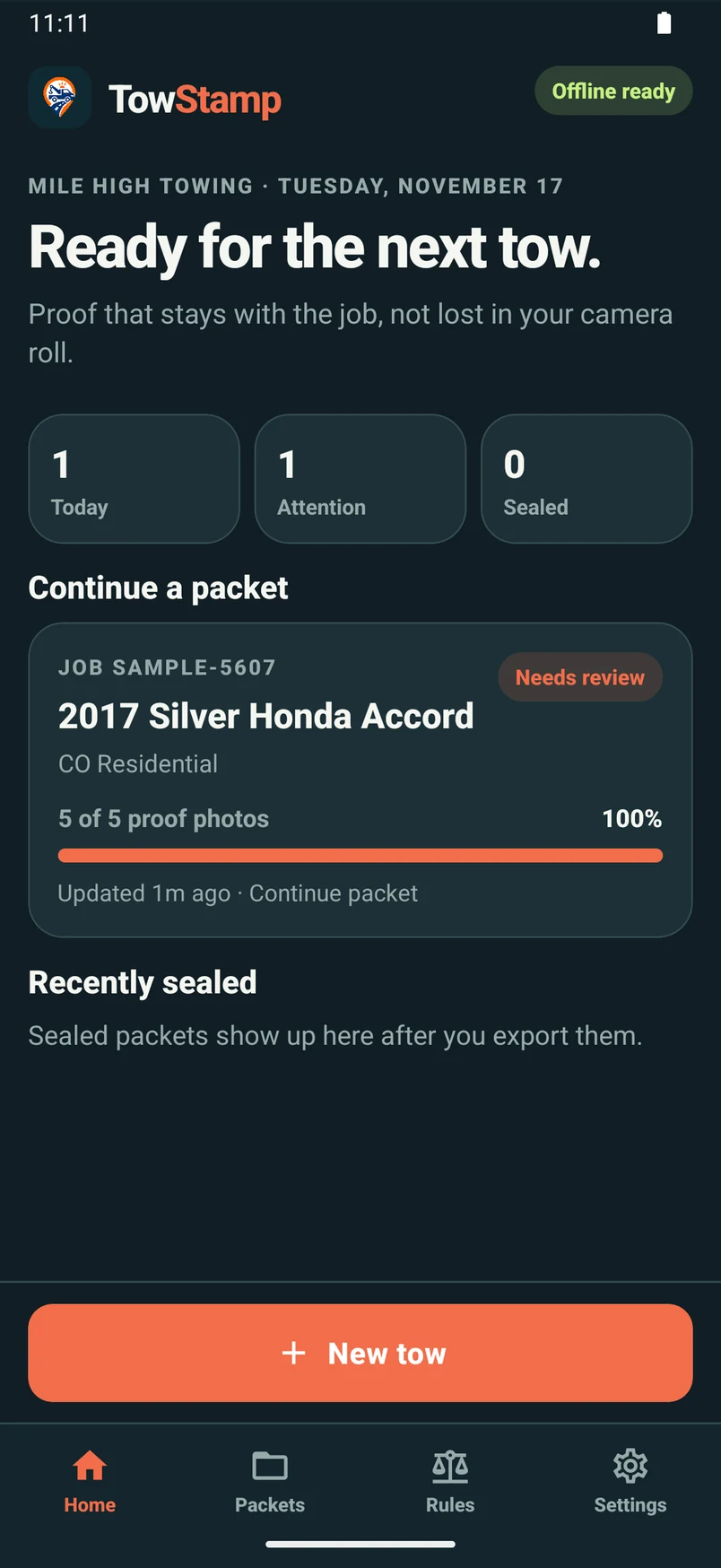


App screens from a sample packet. Sample data is not proof of a real tow.
Photos, video, and packets save on the phone, even with no signal.
Steps, photo sets, and notice timers for your state’s mode.
SHA-256 fingerprints, GPS, and time on every capture.
Attach the PDF to the job you already run. No new dispatch.
A camera roll and a few notes rarely tell the whole story. TowStamp turns the work your drivers already do into an organized, consistent record for every job.
Without TowStamp
With TowStamp
Your first job is a real job. Short tips can walk new drivers through it, and auto-advance moves each step forward once its required shots are in.
Guided pre-tow, scene, and drop-off photos plus short video. Each capture records the time and GPS, or a clear “GPS unavailable.”
Follow your state’s steps: VIN and plate, authorization, the notice log, and sign-off. A review screen shows anything still missing.
One tap seals the packet. SHA-256 fingerprints of the original files make later changes easy to spot.
Export a PDF from the phone and share it into the Towbook job, email, or text with the share menu.
Everything a driver needs to document a tow properly, and everything an owner needs to keep the team consistent.
Pre-tow, scene, and drop-off photos and short clips are written to the phone first. A dead zone doesn’t lose the shot, and there’s no upload to wait for.
Modes for Colorado, California, Chicago, Virginia, Texas, Florida, Georgia, and Arizona set the photo set, steps, and timers. A generic mode covers everything else.
A 3/4-frame guide keeps the whole vehicle in the shot. Where a mode sets a minimum size, like 2000 × 2000 pixels in Colorado, the app asks for a retake.
Every capture records location and time. Sealing adds a fingerprint for each original file and for the packet as a whole.
Export an owner-facing copy that hides the property authorizer’s address and phone, while your full copy keeps everything.
In modes that require a law-enforcement notice, a timer shows the window you have left. Log the agency, call-taker, and case number, and it goes into the packet.
Scan a door-jamb barcode, or read a VIN or plate from a photo. The driver always confirms the value.
Record who authorized the tow and the grounds, with a typed or drawn signature stored with the job.
Add drivers by email. Each person signs in to the app with their own account. The Shop plan covers up to 5 people.
Manage your company on towstamp.com: add or remove drivers, give someone the admin role, subscribe, and update billing.
Big buttons, plain words, and a step bar at the top, so drivers always know what’s next.

Screens from a sample packet. Sample data is not proof of a real tow.
The packet is built on the phone, with no server in the middle. It’s ready to attach to the Towbook job or send to whoever asks for it.
Originals stay unaltered on the device. The date, time, and GPS stamp on each photo is an overlay on the PDF copy only.
TowStamp doesn’t replace Towbook or the dispatch software you already use. It handles the evidence, then hands a PDF back to the job.
 Capture in TowStampPhotos, video, checklist, seal
TowStamp is an independent app and is not affiliated with Towbook.
Each mode is written from that state’s or city’s towing rules, so the app asks for the shots and steps that matter there.
Example: Colorado residential PPI
Guided modes for these states and cities, plus a generic mode when you need a basic packet.
TowStamp organizes field evidence and checklists. It is not legal advice, it is not a law firm, and it does not guarantee compliance with any statute, rule, or ordinance. It does not provide legal immunity.
Towing laws differ by state and city, and they change. Check the current requirements for your area with a qualified attorney or your regulator. You are responsible for your own tows, notices, and records.
TowStamp is an independent app. It is not affiliated with Towbook, any dispatch software, motor club, government agency, or police department.
Start free for 14 days, no card needed. Then subscribe online from your TowStamp account.
Up to 5 drivers
$79/month
After a 14-day free trial
Start 14-day free trialMore than one yard
Custom
Priced per yard
Contact us for fleet pricingPrices in USD. Every new company gets a 14-day free trial. After the trial, creating new jobs needs an active subscription; saved packets can always be opened and exported. Subscribe, update your card, or cancel any time from your account page. Payments are processed by Paddle.
The Android app is in closed testing on Google Play. Testers are added by the Google account email they use on Play, usually a Gmail address or another email on that Google account.
Send a short request with that email, your company name, and your state. The button opens your email app with a message already filled in, addressed to william@towstamp.com. Nothing is sent until you tap Send there.
The iPhone app is coming soon to the App Store and is not part of this Play closed test.
Can’t find your answer? Email william@towstamp.com.
No. TowStamp runs alongside Towbook (or the dispatch software you already use). It is for proof of tow — photos, video, checklists, and a PDF you attach to the job. It does not dispatch trucks.
Yes. Capture is offline-first. Photos and short videos are saved on the phone and don’t drop in a dead zone. You can export the PDF from the device when you’re ready to share it.
Photos, videos, and packets stay on the device. TowStamp does not upload them to a TowStamp cloud. Your TowStamp company account only holds your company details, plan, and your team’s email addresses, so your drivers can sign in.
No. It only records what you see on the vehicle — including a VIN or plate you scan or type. It does not look up owners, lienholders, or DMV records.
No. TowStamp organizes field evidence and checklists. It is not legal advice and does not guarantee compliance with any law. It does not provide legal immunity. You are responsible for your own tows, notices, and records. See the compliance section above for the full disclaimer.
The Shop plan is $79 per month for up to 5 drivers, after a 14-day free trial. Start the trial online, add your drivers, and subscribe from your account page when you’re ready. Multi-yard fleets can contact us for per-yard pricing.
The iPhone app is coming soon to the App Store. The Android app is in closed testing on Google Play. You can request Android beta access with the Google account you use on Play. Testers are added by that email address.
Start the 14-day Shop trial online, or tell us about your fleet and we’ll set it up with you.
Or email william@towstamp.com